TL;DR — Flutter micro front-end at a glance:
- Why: split large apps into independently-shippable modules; parallel teams without merge conflicts
- Monorepo tool: Melos for package isolation + shared workflows
- State management: Riverpod (scales with modules, testable outside widget tree)
- Navigation: GoRouter for state-aware, role-based routing
- Structure:
apps/(admin + customer) +modules/(auth, product, order, notifications) +shared/- Reference repo: sinnoorc/flutter_micro_frontend
Why Micro Front-End Architecture?
Micro front-end architecture is about breaking large applications into smaller parts that can be developed, tested, and maintained independently. This approach is great for complex projects, allowing teams to work on different features simultaneously without stepping on each other’s toes. It also means that different features can be updated and improved without risking the stability of the entire app.
Solving Scalability Challenges: The E-Commerce Example
In this example, we are building both an admin app and a customer app for an e-commerce platform. Here’s how we can break down core features into independent modules and shared components to make development smoother and more scalable:
1. Breaking Down Core Features into Modules
User Authentication Module:
- Handles login, registration, user profiles, and authentication (e.g., token-based auth).
- By keeping this separate, both admin and customer apps can use the same authentication logic without duplication.
Product Catalog Module:
- Manages product listing, filtering, and search functionality.
- Any updates or new features (e.g., adding a new filter) can be applied to both the customer and admin apps easily, avoiding code duplication.
Order Management Module:
- Covers everything related to orders, such as creation, tracking, and status updates.
- Shared between admin (for managing orders) and customer (for viewing and tracking orders).
Notification Module:
- Handles push notifications, in-app alerts, and messaging, providing a consistent experience across both apps.
2. Shared Components Across Admin and Customer Apps
Shared Widgets:
- Common UI components like buttons, forms, and card layouts can be reused across both apps. This ensures a consistent look and feel while saving development time.
Utility Classes:
- Utilities like formatting functions (e.g., date or number formatting), network services, and error handling are shared across both apps to avoid duplication.
State Management Logic:
- Shared state management (e.g., for authentication, products) helps maintain consistency across both apps. Using a shared module for state helps control app state efficiently without duplicating logic.
Tools and Libraries for Micro Front-End Management
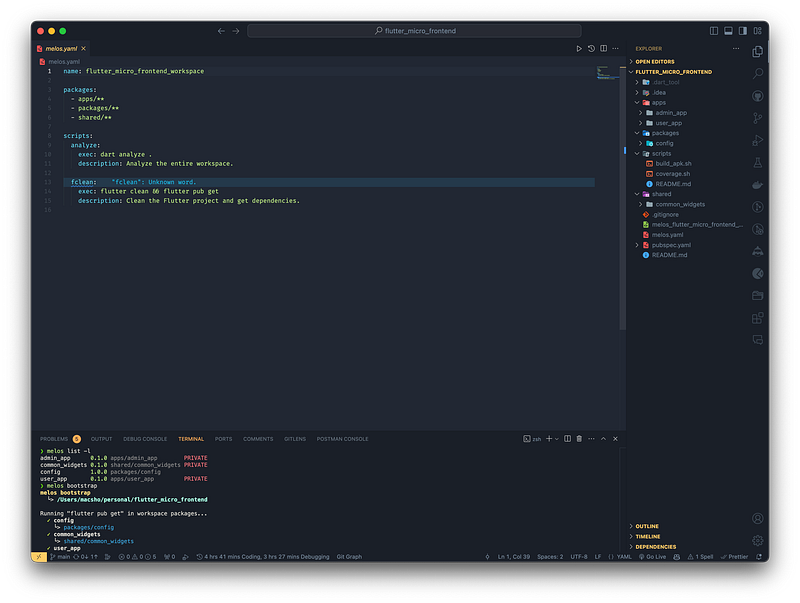
Using Melos for Monorepo Management
Melos is ideal for managing multiple Flutter and Dart projects in a single repository. It offers:
- Package Isolation: Each module can have its own dependencies and logic, making development easier.
- Efficient Workflows: Melos automates linking and testing, ensuring updates are smoothly reflected across all dependent packages.
- Consistency: Shared components can be updated once and applied across both the admin and customer apps.
Melos Documentation — Learn more about Melos and how it can help you manage Flutter monorepos.
State Management with Riverpod
For state management, I chose Riverpod. It’s modern, flexible, and perfect for handling the shared state needed in large projects.
Why Riverpod?
- Scalability: Riverpod’s modular structure allows easy scaling of state management as the app grows.
- Ease of Testing: Unlike some other solutions, Riverpod doesn’t rely on the Flutter widget tree, making it easier to test business logic.
- Efficient Asynchronous Updates: Riverpod handles tasks like API calls and managing real-time updates efficiently, which is crucial for features like live product updates.
Integrating GoRouter for Navigation
Riverpod integrates seamlessly with GoRouter, making it easier to manage dynamic navigation across both admin and customer apps.
Benefits of Riverpod with GoRouter:
- State-Aware Navigation: GoRouter, combined with Riverpod, enables navigation to respond dynamically to changes in app state. For example, the navigation path can change based on whether a user is logged in or their role (admin vs. customer).
- Simplified Route Management: GoRouter makes managing complex routes and deep links easier.
Folder Structure for a Micro Front-End Flutter Project
Below is a simple example of how you could structure your Flutter project using micro front-end architecture:
.
├── README.md
├── apps
│   ├── admin_app
│   │   ├── lib
│   │   │   └── main.dart
│   │   └── pubspec.yaml
│   └── customer_app
│       ├── lib
│       │   └── main.dart
│       └── pubspec.yaml
├── modules
│   ├── auth_module
│   │   ├── lib
│   │   │   └── auth_service.dart
│   │   └── pubspec.yaml
│   ├── product_module
│   │   ├── lib
│   │   │   └── product_service.dart
│   │   └── pubspec.yaml
│   ├── order_module
│   │   ├── lib
│   │   │   └── order_service.dart
│   │   └── pubspec.yaml
│   └── notification_module
│       ├── lib
│       │   └── notification_service.dart
│       └── pubspec.yaml
├── shared
│   ├── widgets
│   │   └── custom_button.dart
│   ├── utils
│   │   └── network_service.dart
│   └── pubspec.yaml
├── melos.yaml
└── pubspec.yaml
Conclusion
Adopting a micro front-end architecture in Flutter can help solve scalability challenges by breaking down a large app into smaller, manageable modules. Using tools like Melos for monorepo management, Riverpod for scalable state handling, and GoRouter for managing dynamic navigation can make the development process smoother, more efficient, and more maintainable.
Whether you’re a beginner or an experienced developer, adopting a modular approach can make a big difference in how you develop and maintain complex apps. I hope this post gives you insights into how you can apply these principles to your projects.
Have you tried breaking down your Flutter apps into smaller modules? I’d love to hear about your experiences or answer any questions you have in the comments below!
GitHub - sinnoorc/flutter_micro_frontend: A scalable Flutter project using micro front-end…